
Switching on Night View Assist Plus
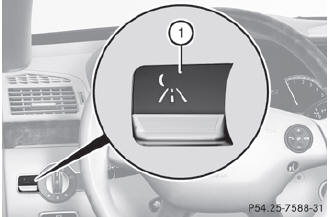
You can only activate Night View Assist Plus if:
• the SmartKey is in position 2 in the ignition lock.
• it is dark.
• the light switch is in the  or
or
 position.
• reverse gear has not been engaged.
 Press button 1.
The Night View Assist Plus display appears in the multifunction display.
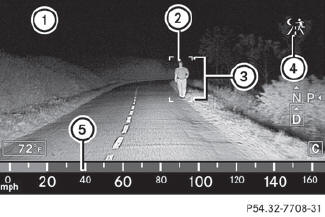
1 Night View Assist Plus display
2 Pedestrian recognized
3 Framing
4 Symbol for active pedestrian recognition
5 Speed display
 The infrared lamps switch on
automatically from a speed of about 6 mph
(10 km/h). This means that you do not have
the full visual range while the vehicle is
stationary and cannot check whether Night
View Assist Plus is working.
The infrared lamps switch on
automatically from a speed of about 6 mph
(10 km/h). This means that you do not have
the full visual range while the vehicle is
stationary and cannot check whether Night
View Assist Plus is working.
When you activate Night View Assist Plus, speed display 5 in the multifunction display changes. Speed display 5 is shown as a bar at the bottom edge of the multifunction display. This line is no longer available for basic menus. You have to deactivate Night View Assist Plus if you want to change a setting using the buttons on the multifunction steering wheel.
See also:
Installing the towing eye
Vehicles with a trailer tow hitch: if possible, secure the towing device on the
trailer tow hitch ().
X Remove the towing eye from the vehicle tool kit ().
WARNING
The exhaust tail pipe may ...
Making a call
Entering a telephone number using the
telephone keypad
Call up the telephone basic menu.
Enter all the digits of the phone number
using the telephone keypad.
To make a call: press the
but ...
Starting procedure with the SmartKey
- To start a gasoline engine: turn the
SmartKey to position 3 in the ignition lock
and release it as soon as the
engine is running.
- To start a diesel engine: turn the
SmartKey to position 2 ...