
Installing/removing the combined cargo cover and net
You can reach the combined cargo cover and net to install and remove it from the cargo compartment and, with the seat backrest folded forwards, from the left-hand rear door.
•► Make sure that the cargo net and the cargo compartment cover are rolled up.
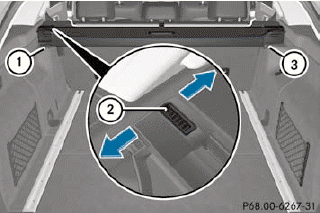
•► To remove: press button 2.
•► Fold the combined cargo cover and net forwards on the left-hand side with the seat backrest folded forwards, and fold it backwards with the seat backrest folded up.
•► First, detach the combined cargo cover and net from left-hand catch 1 and then remove it from right-hand fixture 3.
•► To install: push the combined cargo cover and net up to the stop into right-hand fixture 3.
•► Place the combined cargo cover and net into the left-hand fixture and push it into catch 1 until the combined cargo cover and net engages audibly.
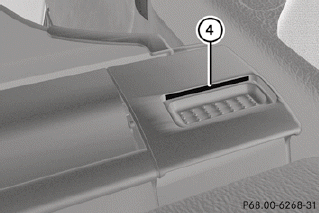
•► Make sure that red lock status indicator 4 is no longer visible. The combined cargo cover and net will otherwise not be locked in place.
See also:
Activating the HOLD function
– Make sure that the activation conditions
are met.
– Depress the brake pedal.
– Quickly depress the brake pedal further
until HOLD display 1 appears in the
multifunction display.
The HOL ...
Tips for driving with DISTRONIC
The following contains descriptions of certain
road and traffic conditions in which you must
be particularly attentive. In such situations,
brake if necessary. DISTRONIC is then
deactivated.
WARN ...
Roadside Assistance button
– Press and hold Roadside Assistance
button 1 for more than two seconds.
This initiates a call to the Mercedes-Benz
Customer Assistance Center. The indicator
lamp in Roadside Assistance but ...