
Tips for driving with DISTRONIC
The following contains descriptions of certain road and traffic conditions in which you must be particularly attentive. In such situations, brake if necessary. DISTRONIC is then deactivated.
WARNING 
The Distronic works to maintain the speed
selected by the driver unless a moving
obstacle proceeding directly ahead of it in the
same travel direction is detected (e.g. following another vehicle ahead of you
at your
set distance).
This means that:
• Your vehicle can pass another
vehicle after
you have changed lanes.
• While in a sharp turn or if the
preceding
vehicle is in a sharp turn, the Distronic
could lose sight of the preceding vehicle.
Your vehicle could then accelerate to the
previously selected speed.
The Distronic regulates only the distance
between your vehicle and those directly
ahead of it, but does not register stationary
objects in the road, e.g.:
• a stopped vehicle in a traffic jam
• a disabled vehicle
• an oncoming vehicle
The driver must always be alert, observe all
traffic and intercede as required by means of
steering or braking the vehicle.
WARNING
The Distronic should not be used in snowy or
icy road conditions.
Cornering, going into and coming out of a
bend
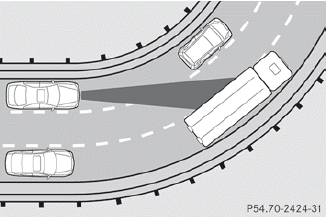
The ability of DISTRONIC to detect vehicles when cornering is limited. Your vehicle may brake unexpectedly or late.
Vehicles traveling on a different line
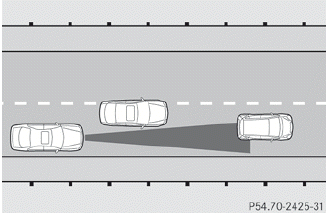
DISTRONIC may not detect vehicles traveling on a different line. The distance to the vehicle in front will be too short.
Other vehicles changing lane
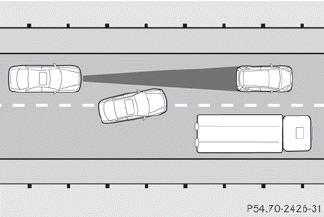
DISTRONIC has not detected the vehicle cutting in yet. The distance to this vehicle will be too short.
Narrow vehicles
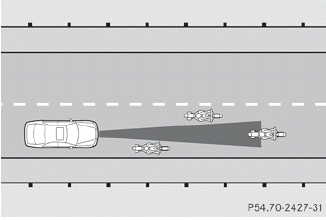
DISTRONIC has not yet detected the vehicle in front on the edge of the road, because of its narrow width. The distance to the vehicle in front will be too short.
Obstructions and stationary vehicles
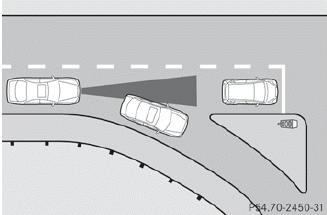
DISTRONIC does not brake for obstructions or stationary vehicles. If, for example, the detected vehicle turns a corner and reveals an obstacle or stationary vehicle, DISTRONIC will not brake for these.
Crossing vehicles
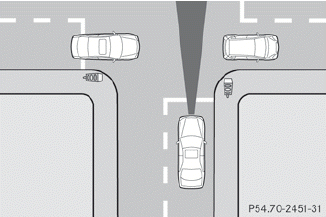
DISTRONIC may detect vehicles that are crossing your lane by mistake. Activating DISTRONIC at, for example, a traffic light with crossing traffic, could cause your vehicle to pull away at the wrong time.
See also:
Switching off the manual drive program
Press the program selector button
repeatedly until C or S
appears in the multifunction display. ...
Important safety notes
Cruise control maintains a constant road
speed for you. It brakes automatically in order
to avoid exceeding the set speed. On long and
steep downhill gradients, especially if the
vehicle is la ...
Calibrating the compass
Make sure that there is sufficient space for you to drive in a circle
without impeding the remaining traffic.
In order to calibrate the compass correctly, observe the following points:
ca ...