
Deactivating/activating ESP®
 Observe the "Important safety notes"
section.
Observe the "Important safety notes"
section.
WARNING 
ESP® should not be deactivated during
normal driving other than in the
circumstances described below. Disabling
the system will reduce vehicle stability in
driving maneuvers.
Do not deactivate ESP® when the emergency
or spare wheel is mounted.
ESP® is activated automatically when the engine is started.
It may be best to deactivate ESP® in the following situations:
• when using snow chains
• in deep snow
• on sand or gravel
WARNING
Switch on ESP® immediately if one of the
previously stated conditions is no longer met.
Otherwise, ESP® cannot stabilize the vehicle
if it begins to lurch or when a wheel spins.
When you deactivate ESP®:
• ESP® no longer improves driving
stability.
• the engine's torque is no longer limited
and
the drive wheels can spin. The spinning of
the wheels results in a cutting action, which
provides better grip.
• traction control is still activated.
• ESP® still provides support when you
brake.
If ESP® is deactivated and one or more wheels
start to spin, the  ESP® warning
lamp in
the instrument cluster flashes. In such
situations, ESP® will not stabilize the vehicle.
ESP® warning
lamp in
the instrument cluster flashes. In such
situations, ESP® will not stabilize the vehicle.
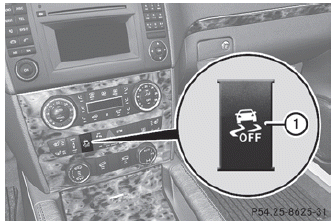
► To deactivate: press button 1.
The  ESP® OFF warning lamp in the
instrument cluster lights up.
ESP® OFF warning lamp in the
instrument cluster lights up.
WARNING
When the  ESP® OFF warning
lamp is lit,
ESP® is deactivated.
ESP® OFF warning
lamp is lit,
ESP® is deactivated.
If the  ESP® warning lamp and
the
ESP® OFF warning lamp remain
lit,
ESP® is not available due to a malfunction.
ESP® warning lamp and
the
ESP® OFF warning lamp remain
lit,
ESP® is not available due to a malfunction.
When ESP® is deactivated or not operational,
vehicle stability in standard driving
maneuvers is reduced.
Adapt your speed and driving to the prevailing
road conditions and to the non-operating
status of the ESP®.
 Avoid spinning the driven wheels for an
extended period with ESP® deactivated.
Avoid spinning the driven wheels for an
extended period with ESP® deactivated.
You could otherwise damage the drivetrain.
► To activate: press button 1.
The ESP® OFF warning lamp in the
instrument cluster goes out.
See also:
Message memory
The on-board computer saves certain display messages. You can call up the
display messages
in the message memory.
– Press the or
button on the steering wheel to
select the Serv. menu.
If th ...
Introduction
The Sett. menu can be used for:
- changing the instrument cluster settings
- changing the light settings
- changing the vehicle settings
- changing the convenience settings
- restoring the fact ...
Using the SmartKey
The SmartKey must be close to the
driver's door handle.
Point the tip of the SmartKey at the driver's
door handle.
Press and hold the button until
the
side windows and the sliding sunr ...