
Dashboard fuse box
 Do not use a pointed object such as a screwdriver to open the
cover in the dashboard. You could damage the dashboard or the cover.
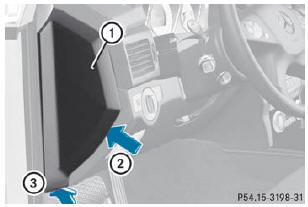
- To open: pull out cover 1 slightly at the bottom in the direction of arrow 3.
- Pull cover 1 outwards in the direction of arrow 2 and remove it.
- To close: clip in cover 1 on the front of the dashboard.
- Fold cover 1 inwards until it engages.
See also:
Opening and closing
Overhead control panel
1. To open
2. To open
3. To close
•► Turn the SmartKey to position 1 or 2 in the
ignition lock.
•► Press or pull the switch in the
corresponding di ...
Vehicle
Activating/deactivating the automatic
door locking feature
If you select the Auto. Door Locks
function, the vehicle is centrally locked above
a speed of around 9 mph.
For further information o ...
Activating the HOLD function
Make sure that the activation conditions
are met.
Depress the brake pedal.
Quickly depress the brake pedal further
until HOLD display 1 appears in the
instrument cluster.
The HOLD functi ...