
Opening and closing
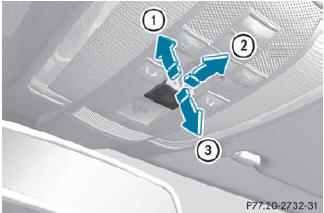
Overhead control panel
1. To open
2. To open
3. To close
•► Turn the SmartKey to position 1 or 2 in the ignition lock.
•► Press or pull the  switch in the
corresponding direction.
switch in the
corresponding direction.
If you press the switch beyond
the
point of resistance, an automatic opening/
closing process is started in the
corresponding direction. You can stop
automatic operation by operating the
switch again.
See also:
General notes
When you lock the vehicle, you can simultaneously:
• close the side windows
• close the sliding sunroof or the panorama roof with power tilt/sliding panel
On vehicles with a panorama roof with powe ...
Useful information
This Operator's Manual describes all models and all standard and optional equipment
of your vehicle available at the time of publication of the Operator's Manual. Country-specific
diffe ...
Closing the hood
WARNING
When closing the hood, use extreme caution
not to catch hands or fingers. Be careful that
you do not close the hood on anyone.
Make sure the hood is securely engaged
before driving ...