
Setting the compass
 Determine your position using
the following
zone maps.
Determine your position using
the following
zone maps.
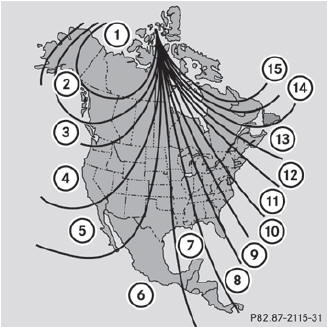
North America zone map
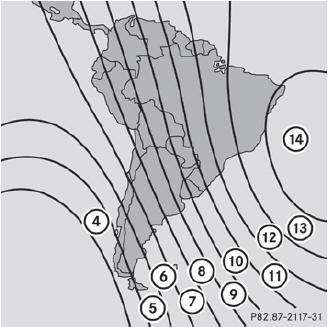
South America zone map
Press a round pin into opening
3 for approximately three
seconds.
The currently selected zone appears in
compass display 2.
To select the zone: press a
round pin into
opening 3 repeatedly until
the desired zone is selected.
The zone has been selected when compass
display 2 shows the heading.
This takes a few seconds.
See also:
Cleaning the plastic trim
WARNING
When cleaning the steering wheel boss and
dashboard, do not use cockpit sprays or
cleaning agents containing solvents. Cleaning
agents containing solvents cause the surface
to becom ...
Instruction labels for tires and loads
WARNING
Do not overload the tires by exceeding the
specified load limit as indicated on the Tire
and Loading Information placard on the
driver's door B-pillar. Overloading the tires
c ...
Problems with the SmartKey
Problem
You cannot lock or unlock the vehicle using the SmartKey.
Possible causes/consequences and Solutions
The SmartKey battery is discharged or nearly discharged.
Try again to lock/unlock th ...