
Mechanical key
General notes
If the vehicle can no longer be unlocked with the SmartKey, use the mechanical key.
If you use the mechanical key to unlock and open the driver's door, the anti-theft alarm system will be triggered.
There are several ways to turn off the alarm:
► To turn the alarm off with the
SmartKey: press the  button
on the SmartKey.
button
on the SmartKey.
or
► Insert the SmartKey into the ignition
lock.
or
► To deactivate the alarm with KEYLESSGO:
press the Start/Stop button in the
ignition lock. The SmartKey must be in the
vehicle.
or
► Lock or unlock the vehicle using
KEYLESSGO.
The SmartKey must be outside the vehicle.
Removing the mechanical key
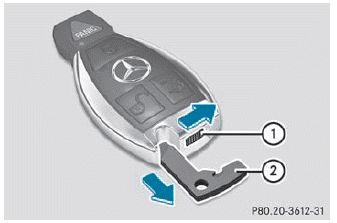
► Push release catch 1 in the direction of the arrow and at the same time, remove mechanical key 2 from the SmartKey.
See also:
Headlamp cleaning system
The headlamps are cleaned automatically if
the "Wipe with washer fluid" function is
operated ten times while the lights are on and
the engine is running. When you
switch off the igni ...
DVD menu
Note
You will find further information on the DVD
menu in the "Video" section.
To call up the DVD menu
Press the button on the remote
control
and show the menu.
Select Video DVD ...
Clearing the shift range restriction
- Pull and hold the right-hand steering wheel
paddle shifter until D is shown again in the
multifunction display.
The automatic transmission shifts from the
current shift range directly to D.
...