
Lap evaluation
This function is only available if you have stored at least two laps and have stopped the RACETIMER.
 Press
Press
 or
or
 on the steering wheel
to select the AMG menu.
on the steering wheel
to select the AMG menu.
Press the
 button repeatedly until the
lap evaluation is shown.
button repeatedly until the
lap evaluation is shown.
Each lap is shown in a separate submenu.
The fastest lap is indicated by flashing
symbol 1.
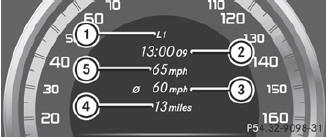
1 Lap
2 Lap time
3 Average lap speed
4 Lap length
5 Top speed during lap
Press the
or
 button to select a
different lap evaluation.
button to select a
different lap evaluation.
See also:
"Minispare" emergency spare wheel
The "Minispare" emergency spare wheel can
be found in the stowage well under the trunk
floor.
Lift the trunk floor up.
Remove tool kit tray 1.
Turn stowage well ...
Automatic locking feature
The vehicle locks automatically when the
ignition is switched on and the wheels of the
vehicle are turning at a speed of more than
9 mph (15 km/h).
You could therefore be locked out when:
- th ...
Storing settings
With the memory function, you can store up to three different settings, e.g.
for three different people.
The following settings are stored as a single memory preset:
position of the seat, backr ...