
General information
The program selector button allows you to choose between different driving characteristics.
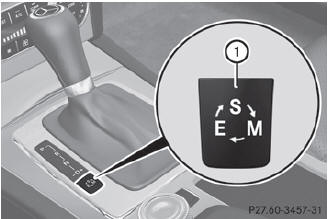
Example: program selector button
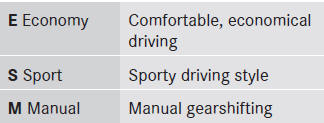
 For further information on the
automatic
drive program.
For further information on the
automatic
drive program.
Only change from automatic drive program E or S to manual drive program M when the vehicle is stationary.
 Press program selector button 1
repeatedly until the letter for the desired
gearshift program appears in the
multifunction display.
Press program selector button 1
repeatedly until the letter for the desired
gearshift program appears in the
multifunction display.
When the engine is started, the
automatic
transmission always switches to automatic
drive program E (drive program C in AMG
vehicles).
See also:
Derestricting the shift range
Briefly press the selector lever
to the right towards D+.
or
Pull the right-hand steering wheel
paddle shifter.
The shift range is derestricted. ...
DOT, Tire Identification Number (TIN)
U.S. tire regulations prescribe that every
manufacturer of new tires or retreader has to
imprint a TIN in or on the sidewall of each tire
produced.
The TIN is a unique identification number. ...
Correct driver's seat position
Observe the safety guidelines on seat
adjustment.
Check whether you have adjusted
seat 3
properly.
Manual and electrical seat adjustment.
Electrical seat adjustment.
When adjusting the se ...