
Trip computer "From start" or "From reset"
The values in the From Start submenu are calculated from the start of a journey, while the values in the From Reset submenu are calculated from the last time the submenu was reset.
– Press the  or
or
 button on the
steering wheel to select the Trip menu.
button on the
steering wheel to select the Trip menu.
– Press the  or
or
 button to select
From Start or From Reset.
button to select
From Start or From Reset.
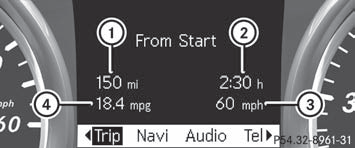
Trip computer "From start" (example)
1 Distance
2 Time
3 Average speed
4 Average fuel consumption
The From Start trip computer is reset
automatically if:
- the ignition has been switched off for more than four hours.
- 999 hours have been exceeded.
- 9,999 miles have been exceeded.
When 9,999 hours or 99,999 miles have been exceeded, the trip computer is automatically reset From Reset.
See also:
Safety
As it should be, the M-Class is full of standard safety features like an
electronic stability system, antilock brakes, traction control, side curtain
airbags, and side-impact airbags for the front ...
Driving tips
AMG vehicles
When shifting down, the double-clutch
function is active regardless of the currently
selected drive program. The double-clutch
function reduces load change reactions and
is condu ...
In all its finery: restyled dashboard and high-grade surfaces
One of the design work's main points of focus in the interior was on
restyling the dashboard with the aim of creating a sporty, high-quality look. At
the same time the trim concept was also enhanc ...