
KEYLESS-GO
General information
Vehicles with KEYLESS-GO are equipped with a SmartKey featuring an integrated KEYLESSGO function and a detachable Start/Stop button.
The Start/Stop button must be inserted in the ignition lock and the KEYLESS-GO key must be in the vehicle.
Pressing the Start/Stop button several times in succession corresponds to the different SmartKey positions in the ignition lock. This is only the case if you are not depressing the brake pedal.
If you depress the brake pedal and press the Start/Stop button, the engine starts immediately.
The Start/Stop button can be removed from the ignition lock. Then, you can insert the SmartKey into the ignition lock.
 You do not have to remove the Start/Stop
button from the ignition lock when you
leave the vehicle. However, you should
always take the SmartKey with you when
leaving the vehicle. The vehicle can be
started with the Start/Stop button and the
electrical equipment can be operated while
the SmartKey is in the vehicle.
You do not have to remove the Start/Stop
button from the ignition lock when you
leave the vehicle. However, you should
always take the SmartKey with you when
leaving the vehicle. The vehicle can be
started with the Start/Stop button and the
electrical equipment can be operated while
the SmartKey is in the vehicle.
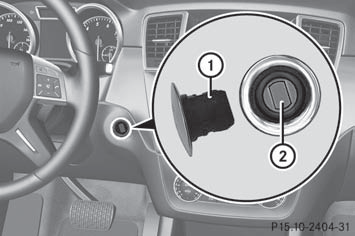
- Insert Start/Stop button 1 into ignition lock 2.
When you insert Start/Stop button 1
into ignition lock 2, the system requires a
detection time of approximately two
seconds before you can use Start/Stop
button 1.
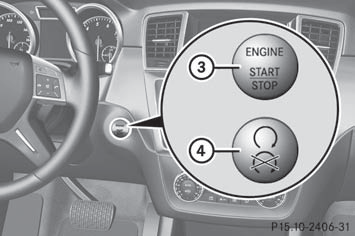
Start/Stop button
3 USA only
4 Canada only
- Position 0: if Start/Stop button 1 has not yet been pressed, this corresponds to the SmartKey being removed from the ignition.
- Position 1: press Start/Stop button 1 once.
You can now activate the windshield wipers, for example.
If you press Start/Stop button 1 twice
when in this position, the power supply is
deactivated again.
- Position 2 (ignition): press Start/Stop button 1 twice.
If you press Start/Stop button 1 once
when in this position and the driver's door
is open, the power supply is deactivated
again.
As soon as the ignition is switched on, all the indicator lamps in the instrument cluster light up. If an indicator lamp does not go out after the engine is started or if it lights up while the vehicle is in motion, see.
See also:
General notes
The Lane Tracking package consists of Blind
Spot Assist (Y page 198) and Lane Keeping
Assist. ...
Important safety notes
WARNING
Only use roof racks approved by Mercedes-Benz for your vehicle model to avoid
damage
to the vehicle.
Follow the manufacturer's installation
instructions. Otherwise, an improperly
a ...
Calibrating the compass
Make sure that there is
sufficient space for
you to drive in a circle without impeding the
remaining traffic.
In order to calibrate the compass correctly,
observe the following points:
• ca ...