
Overview of interior lighting
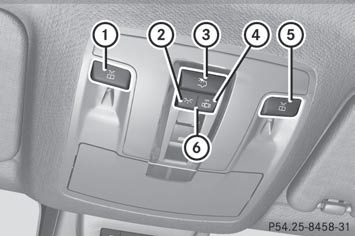
Overhead control panel
1  To switch the left-hand front
reading
lamp on/off
To switch the left-hand front
reading
lamp on/off
2  To switch the front interior
lighting
on
To switch the front interior
lighting
on
3  To switch the rear interior
lighting
on/off
To switch the rear interior
lighting
on/off
4  To switch the front interior
lighting/automatic interior lighting control off
To switch the front interior
lighting/automatic interior lighting control off
5  To switch the right-hand front
reading lamp on/off
To switch the right-hand front
reading lamp on/off
6 To switch the automatic interior lighting
control on
See also:
Intelligent solutions promote excellent safety
The GL-Class makes full use of the advantages of its unitised body, combining
optimum strength with intelligent lightweight steel design. The result is
excellent passive safety. Combined with the ...
RACETIMER
Displaying and starting RACETIMER
WARNING
The RACETIMER feature is only for use on
roads and in conditions where high speed
driving is permitted. Racing on public roads is
prohibited under ...
Adjusting the steering wheel
manually
1 Release lever
2 To adjust the steering wheel height
3 To adjust the steering wheel position (fore-and-aft adjustment)
- Push release lever 1 down completely.
The steering column is unlocked.
...