
RACETIMER
Displaying and starting RACETIMER
 WARNING
The RACETIMER feature is only for use on
roads and in conditions where high speed
driving is permitted. Racing on public roads is
prohibited under all circumstances. The driver
is and must always remain responsible for
following posted speed limits.
You can use the RACETIMER to store lap times.
•► Press  on the steering wheel
to select the AMG menu.
on the steering wheel
to select the AMG menu.
•► Press the  button repeatedly until
the
RACETIMER is shown.
button repeatedly until
the
RACETIMER is shown.
If RACETIMER is selected, the menu bar
cannot be called up with the  and
and  buttons.
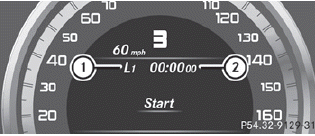
1. Lap
2. RACETIMER
You can start the RACETIMER when the engine is running or if the SmartKey is in position 2 in the ignition lock.
•► To start: press the  button to
start the
RACETIMER.
button to
start the
RACETIMER.
Displaying the intermediate time
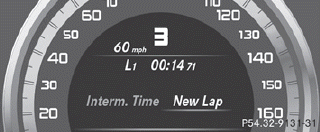
•► Press to select Interm.
Time.
•► Press the button to confirm.
The intermediate time is displayed for five seconds.
Starting a new lap
It is possible to store a maximum of sixteen laps.
•► Press to confirm New Lap.
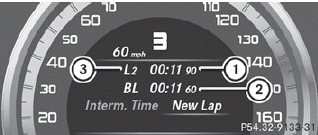
1. RACETIMER
2. Fastest lap time (best lap)
3. Lap
Stopping the RACETIMER
•► Press the  button on the
steering
wheel.
button on the
steering
wheel.
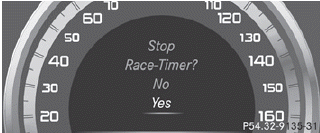
•► Press to confirm YES.
The RACETIMER interrupts timing when you
stop the vehicle and turn the SmartKey to
position 1 in the ignition lock. When you turn
the SmartKey to position 2 or 3 and then
press the to confirm Start, timing
is
continued.
Resetting the current lap
•► Stop the RACETIMER.
•► Press to select Reset Lap.
•► Press to reset the lap time to "0”.
Deleting all laps
If you switch off the engine, the RACETIMER is reset to "0" after 30 seconds. All laps are deleted.
You cannot delete individual stored laps. If you have stopped 16 laps, the current lap does not have to be reset.
•► Reset the current lap.
•► Press to confirm Reset.
Reset Race Timer? appears in the multifunction display.
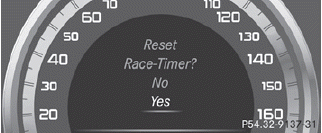
•► Press the  button to select Yes
and
press the button to confirm.
button to select Yes
and
press the button to confirm.
All laps are deleted.
See also:
Loading guidelines
WARNING
Always fasten items being carried as securely
as possible. Use cargo tie-down rings and
fastening materials appropriate for the weight
and size of the load.
In an accident, during ...
Coupling up a trailer
Observe the maximum permissible trailer dimensions (width and length).
Most U.S. states and all Canadian provinces require by law:
safety chains between the towing vehicle and the trailer. The ch ...
PRE-SAFE® (preventative occupant
protection)
WARNING
The PRE-SAFE® system reduces the impact of
an accident on vehicle occupants, as long as
their seat belts have been fastened correctly.
Although your vehicle is equipped with a PRESAFE
...