
Locking the vehicle (mechanical key)
If the vehicle can no longer be locked with the
SmartKey, use the mechanical key.
- Open the driver's door.
- Close the front-passenger door, the rear
doors and the tailgate.
- Press the locking button.
- Check whether the locking knobs on the
front-passenger door and the rear doors
are still visible. Press down the locking
knobs by hand, if necessary.
- Close the driver's door.
- Take the mechanical key out of the
SmartKey.
- Insert the mechanical key into the lock of
the driver's door as far as it will go.
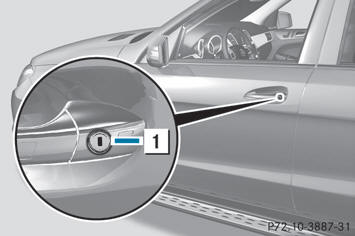
- Turn the mechanical key clockwise as far
as it will go to position 1.
- Turn the mechanical key back and remove
it.
- Make sure that the doors and the tailgate
are locked.
- Insert the mechanical key into the
SmartKey.
 If you lock the vehicle as
described above,
the fuel filler flap is not locked. The antitheft
alarm system is not armed.
If you lock the vehicle as
described above,
the fuel filler flap is not locked. The antitheft
alarm system is not armed.
See also:
Interior
Shoppers will see few differences in the CLS versus the rest of the Mercedes
lineup, though I felt it was a step up from the E-Class and a step below the
CL-Class, which is appropriate given all t ...
Notes on the Operator's Manual
This Operator's Manual contains a great deal of helpful information. We urge
you to read it carefully and familiarize yourself with the vehicle before driving.
For your own safety and longer se ...
Releasing seat belts
► Press release button 4 and
guide belt tongue 2 back towards belt
sash guide 1.
Make sure that the seat belt is fully rolled
up. Otherwise, the seat belt or belt tongue
will be trapped i ...