
Locking and unlocking centrally
The SmartKey centrally locks/unlocks:
- the doors
- the tailgate
- the fuel filler flap
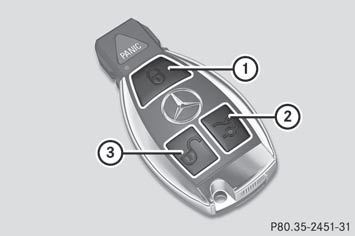
1  Locks the vehicle
2  Opens/closes the tailgate
3  Unlocks the vehicle
When unlocking, the turn signals flash once.
When locking, they flash three times.
When it is dark, the surround lighting also comes on if it is activated in the on-board computer.
You can also set an audible signal to confirm that the vehicle has been locked. The audible signal can be activated and deactivated using the on-board computer.
- To unlock centrally: press the
button.
If you do not open the vehicle within
approximately 40 seconds of unlocking:
- the vehicle is locked again.
- the theft deterrent locking system is armed
again.
- To lock centrally: press the
button.
See also:
Function restrictions
You will not be able to use the telephone, will
no longer be able to use the telephone, or you
may have to wait before using it, in the
following situations:
• when the mobile phone is switch ...
Important safety notes
The EASY-ENTRY/EXIT feature makes getting
in and out of your vehicle easier.
You can activate and deactivate the EASYENTRY/
EXIT feature in the on-board
computer.
WARNING
You must ...
Entering a point of interest using name
search
This function allows you to access all the
points of interest available on the digital map.
Select By Name from the menu and press
to confirm.
You will see a list of further selection
option ...