
Panic alarm
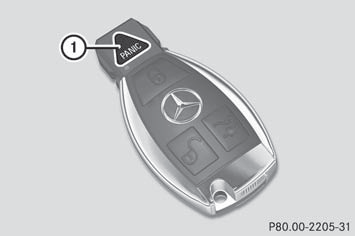
- To activate: press  button 1
for at
least one second.
button 1
for at
least one second.
An alarm sounds and the exterior lighting
flashes.
- To deactivate: press  button 1
again.
button 1
again.
or
- Insert the SmartKey into the ignition lock.
or
- Press the KEYLESS-GO Start/Stop button.
The KEYLESS-GO key must be in the
vehicle.
 USA only:
This device complies with Part 15 of the
FCC Rules. Operation is subject to the
following two conditions:
1. This device may not cause harmful
interference, and
2. this device must accept any interference
received, including interference that may
cause undesired operation.
Any unauthorized modification to this
device could void the user's authority to
operate the equipment.
The product label with FCC ID and IC
certification number can be found in the
battery case of the SmartKey.
Canada only:
This device complies with RSS-Gen of
Industry Canada. Operation is subject to
the following two conditions:
1. This device may not cause interference,
and
2. this device must accept any interference
received, including interference that may
cause undesired operation.
Any unauthorized modification to this
device could void the user's authority to
operate the equipment.
The product label with FCC ID and IC
certification number can be found in the
battery case of the SmartKey.
See also:
Mercedes-Benz M-Class
With the 2012 M-Class, Mercedes brings the comfortable, luxurious driving
experience of its flagship S-Class sedan to its most popular SUV.
If you don't like to be disturbed by the world around yo ...
Opening and closing the sidewindows
1 Front left
2 Front right
3 Rear right
4 Rear left
The switches for all side windows are located
on the driver's door. There is also a switch on
each door for the corresponding side window.
...
Trailer towing
PARKTRONIC is deactivated for the rear area
when you establish an electrical connection
between your vehicle and a trailer.
Fold in the ball coupling if the trailer tow
hitch is not requir ...