
Warning displays
The warning displays show the distance between the sensors and the obstacle. The warning display for the front area is located on the dashboard above the center air vents.
The warning display for the rear area is in the roof lamp in the rear compartment.
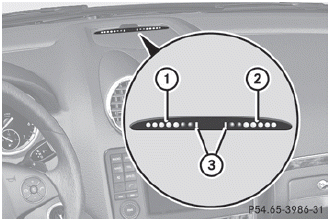
Warning display for the front area
1 Segments on the left-hand side of the
vehicle
2 Segments on the right-hand side of the
vehicle
3 Segments showing operational readiness
The warning display for each side of the vehicle is divided into five yellow and two red segments. PARKTRONIC is operational if yellow segments showing operational readiness 3 light up.
The selected transmission position determines which warning display is active when the engine is running.
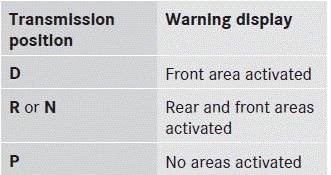
One or more segments light up as the vehicle approaches an obstacle, depending on the vehicle's distance from the obstacle.
From the:
• sixth segment onwards, you will hear an
intermittent warning tone for
approximately two seconds.
• seventh segment onwards, you will hear a
warning tone for approximately two
seconds. This indicates that you have now
reached the minimum distance.
See also:
Automatic interior lighting control
To switch on/off: press the | button. When the automatic interior lighting control
is activated, the button is flush with the overhead control panel.
The interior lighting automatically switches on ...
Selecting a film/title
This function is only available if the DVD is
divided into several films/tracks. If the DVD
contains several films, these can be selected
directly. A film can be selected either when
the DVD i ...
Luggage holder
The luggage holder can be used to secure
light loads against the side wall of the cargo
compartment to prevent them from moving
around.
Only use the luggage holder to secure
cargo with a ...