
ATA (Anti-Theft Alarm system)
A visual and audible alarm is triggered if the alarm system is armed and you open:
• a door
• the vehicle with the mechanical key
• the tailgate
• the hood
The alarm is not switched off, even if you close the open door that has triggered it, for example.
 If the alarm stays on for more than 30
seconds, the emergency call system
mbrace (USA only) or TELE AID (Canada
only) initiates a call to the Customer
Assistance Center automatically. The
emergency call system initiates the call
provided that:
If the alarm stays on for more than 30
seconds, the emergency call system
mbrace (USA only) or TELE AID (Canada
only) initiates a call to the Customer
Assistance Center automatically. The
emergency call system initiates the call
provided that:
• you have subscribed to the mbrace/TELE
AID service.
• the mbrace/TELE AID service has been
activated properly.
• the required mobile phone, power supply
and GPS are available.
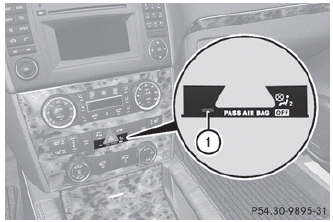
► To arm: lock the vehicle with the SmartKey or KEYLESS-GO.
Indicator lamp 1 flashes. The alarm system is armed after approximately 10 seconds.
► To deactivate: unlock the vehicle with the SmartKey or KEYLESS-GO.
X To stop the alarm using the SmartKey:
insert the SmartKey into the ignition lock.
The alarm is switched off.
or
► Press the
 button on the
SmartKey.
button on the
SmartKey.
The alarm is switched off.
► To stop the alarm using KEYLESS-GO:
grasp the outside door handle. The SmartKey must be outside the vehicle.
The alarm is switched off.
or
► Press the Start/Stop button on the
dashboard. The SmartKey must be inside
the vehicle.
The alarm is switched off.
See also:
Towing a vehicle with both axles on the ground
When having your vehicle towed, observe the
important safety notes.
WARNING
The power assistance for the steering and the
brake force booster do not work when the
engine is not running. You ...
Interchanging the wheels
WARNING
Rotate front and rear wheels only if the tires
are of the same dimension.
If your vehicle is equipped with mixed-size
tires (different tire dimensions front vs. rear),
tire rotation i ...
Safety
The R-Class received a Good overall score — the highest rating possible — in
the Insurance Institute for Highway Safety's frontal-offset and side-impact
crash tests. It hadn't yet undergone IIHS' ...