
Opening and closing the side windows
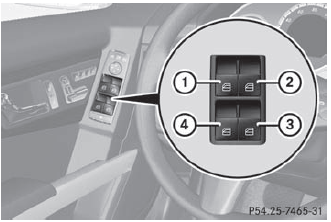
- Front left
- Front right
- ear right
- ear left
The switches for all side windows are located on the driver's door. There is also a switch on each door for the corresponding side window. The switches on the driver's door take precedence.
 The side windows cannot be operated from the rear when the override feature
for the side windows is activated ().
The side windows cannot be operated from the rear when the override feature
for the side windows is activated ().
- Turn the SmartKey to position 1 or 2 in the ignition lock.
- To open: press the corresponding switch.
- To close: pull the corresponding switch.
If you press the switch beyond the point of resistance, an automatic opening/
closing process is started in the corresponding direction. You can stop automatic
operation by operating the switch again.
You can continue to operate the side windows after you switch off the engine
or remove the SmartKey. This function is available for up to five minutes or until
the driver's or front-passenger door is opened.
See also:
Problems with your vehicle
If you should experience a problem with your vehicle, particularly one that you
believe may affect its safe operation, we urge you to contact an authorized Mercedes-Benz
Center immediately to have ...
Maximum gradient-climbing capability
For good road surface conditions, the
maximum gradient-climbing capability is
100%, which corresponds to an approach/
departure angle of 45°. Note that the
vehicle's gradient-climbing capability
...
Resetting to factory settings
For safety reasons, the Day Lights function
in the Lights submenu is only reset when the
vehicle is stationary.
•► Press the button on the
steering wheel to select the Settings
menu.
...