
Resetting values
You can reset the values of the following
functions:
• Trip odometer
• Trip computer "From start"
• Trip computer "From reset"
 Press the
  or
or
 button on the
steering wheel to select the Trip menu.
button on the
steering wheel to select the Trip menu.
Press the  or
or
 button to select the
function that you wish to reset.
button to select the
function that you wish to reset.
Press  .
.
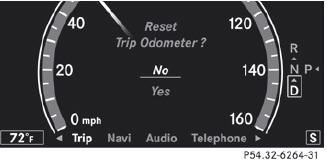
Resetting the trip odometer (example)
Press to select Yes
and press
to confirm.
See also:
Displaying the range and current fuel
consumption
•► Press the button on the
steering wheel to select the Trip menu.
•► Press the button to select
current fuel consumption21 and
approximate range.
The approximate range that ca ...
Message memory
The on-board computer saves certain display messages. You can call up the
display messages
in the message memory.
•► Press the button on the steering
wheel to select the Serv. menu.
If ...
Replacing the windshield wiper blades
Removing the wiper blades
Remove the SmartKey from the
ignition lock or turn it to position 0 (KEYLESS-GO).
Fold the wiper arm away from the
windshield until it engages.
Set the wiper blade ...