
Assigning the programmable button (favorites)
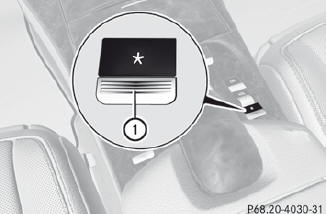
1 Programmable button
You can assign the following predefined
functions to the  programmable
button:
programmable
button:
• ECO: you can activate or deactivate the ECO
start/stop function.
• Massage, Driver's Seat: you can switch
the massage function for the driver's seat
on and off.
• Massage, Front Passenger's Seat:
you can switch the massage function for
the front-passenger seat on and off.
• Massage, Driver's and Front
Passenger's Seat: you can switch the
massage function for the driver's and frontpassenger
seats on and off.
• Display OFF: you can switch the
COMAND display off or on.
• Tow-away Alarm: you can arm or
deactivate the tow-away alarm.
• Interior Motion Sensor: you can arm or
deactivate the interior motion sensor.
• Tow-away Alarm and Interior Motion
Sensor: you can arm or deactivate the towaway
alarm and the interior motion sensor.
• Repeat Navigation Command: you can
have the most recent recommendation by
the navigation system repeated.
 To assign the programmable button: select Vehicle by sliding
 and turning
 the COMAND controller and press
 to confirm.
Select System and press to
confirm.
Select Favorites Button and press
to
confirm.
The list of predefined functions appears.
The  dot in front of the list entry
indicates
the current setting.
dot in front of the list entry
indicates
the current setting.
To change the setting: turn
the
COMAND controller and select the desired
function.
To store the setting and exit the menu: press
the COMAND controller.
See also:
Deactivating/activating PARKTRONIC
1 Indicator lamp
2 To deactivate/activate PARKTRONIC
If indicator lamp 1 lights up, PARKTRONIC is
deactivated. Active Park Assist is then also
deactivated.
PARKTRONIC is automatically ac ...
Accepting a call
If someone calls you when you are in the Tel
menu, a display message appears in the
multifunction display, for example:
•► Press the button on the
steering
wheel to accept an incomin ...
Rear stowage compartment
In the S 600 model, you can fold the rear part
of the trunk floor forwards.
1 Stowage well
2 Stowage compartment ...