
Rear seat head restraints
WARNING
For safety reasons, always drive with the rear
head restraints in the upright position when
the rear seats are occupied.
Keep the area around head restraints clear of
articles (e.g. clothing) to not obstruct the
folding operation of the head restraints.
WARNING
Make sure the rear seat head restraints
engage when placing them upright manually.
Otherwise their protective function cannot be
ensured.
The back of the head will not be supported in
the event of a collision. That could cause
serious or even fatal injuries. Rear seat
occupants can be seriously injured or killed.
Folding back the rear seat head restraints from the front
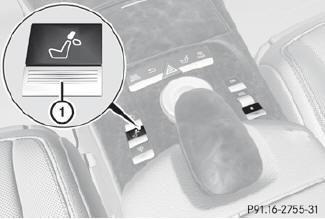
 Make sure that the SmartKey is in position
1 or 2 in the ignition lock.
Make sure that the SmartKey is in position
1 or 2 in the ignition lock.
Press button 1.
Folding the rear seat head restraints into position electrically (outer head restraints)
Press and hold button 1 until the head
restraints have folded into position.
 If a rear-seat passenger inserts the seat
belt into the buckle, the head restraint on
the corresponding outer seat folds up
automatically.
If a rear-seat passenger inserts the seat
belt into the buckle, the head restraint on
the corresponding outer seat folds up
automatically.
Folding the rear seat head restraints into position manually
Only the center rear seat head restraint can be folded into position manually.
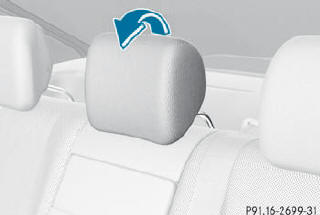
Pull the head restraint up until it engages.
Adjusting the luxury head restraints in the rear compartment
WARNING
When folding back the side cushions, never
reach between the side cushion and the
mounting post. You could otherwise be
trapped.
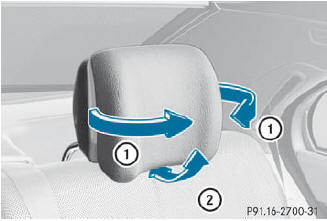
You can adjust side bolsters 1 of the luxury head restraint individually.
To adjust the side bolsters of the head
restraint: push or pull side bolsters 1 into
the desired position.
To adjust the head restraint angle: hold
the head restraint by the upper edge and
slide it forwards or back in the direction of
arrow 2.
See also:
Hiding display messages
You can hide some display messages with a low priority.
Press the or
button on the steering wheel to
hide the display message. The display message is cleared.
Display messages with a hig ...
Canceling Parking Guidance
Press the PARKTRONIC button on the
dashboard.
Parking Guidance is canceled immediately
and PARKTRONIC is deactivated.
Parking Guidance is canceled automatically if
it is no longer possible to ...
Problems with the windshield wipers
The windshield wipers are obstructed
Leaves or snow, for example, may be
obstructing the windshield wiper movement.
The wiper motor has been deactivated.
•► For safety reasons, you should r ...