
Adjusting the front-passenger seat from the rear
WARNING
When adjusting the front passenger seat,
make sure the seat, if occupied, is as far from
the front passenger front air bag as possible.
Otherwise, the passenger could be seriously
or even fatally injured in the event of an
accident or braking maneuver.
Make sure no one is caught or injured while
the seat is being adjusted.
Even with the SmartKey or SmartKey with
KEYLESS-GO removed from the starter switch
or the SmartKey with KEYLESS-GO removed
from the vehicle, the power seats can be
operated. Therefore, do not leave children
unattended in the vehicle, or with access to
an unlocked vehicle. A child's unsupervised
access to a vehicle could result in an accident
and/or serious personal injury.
 Do not move the front-passenger seat
fully forwards if there are objects in the
parcel net in the front-passenger footwell.
Do not move the front-passenger seat
fully forwards if there are objects in the
parcel net in the front-passenger footwell.
The objects could otherwise be damaged.
You can use the override button to disable this function.
The button is located in the rear door on the front-passenger side.
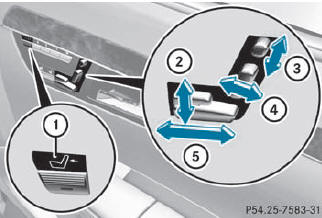
1 To select the front-passenger seat or rearcompartment seat
2 Seat height
3 Head restraint height
4 Backrest angle
5 Seat fore-and-aft adjustment
 To select the front-passenger seat: press button 1.
The front-passenger seat is selected if the
indicator lamp in the button lights up.
Adjust the front-passenger seat with
buttons 2, 3, 4 and 5.
To select the rear-compartment seat: press button 1.
The rear-compartment seat is selected
again.
See also:
Activating/deactivating SPORT handling
mode
WARNING
The SPORT handling mode should not be
switched on during normal driving.
Switching on the SPORT handling mode will
result in the following:
- no restriction to the engine torque
...
Back button
1 Back button
To exit the menu: press back button 1
briefly.
COMAND changes to the next higher menu
level in the current operating mode.
You can also exit a menu by sliding
or the CO ...
Locking the trunk separately
You can lock the trunk separately. If you then
unlock the vehicle centrally, the trunk
remains locked and cannot be opened.
Close the trunk lid.
Take the mechanical key out of the
SmartKey ...