
Top Tether
Top Tether provides an additional connection between the child restraint system secured with ISOFIX and the rear seat. It helps reduce the risk of injury even further.
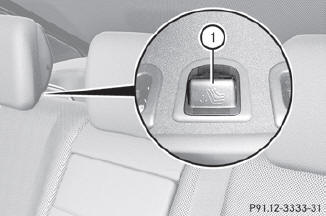
The Top Tether anchorage points are located in the rear compartment behind the head restraints.
 Vehicles with electrically adjustable rear
seats: move the rear seat backrests to an
upright position.
Vehicles with electrically adjustable rear
seats: move the rear seat backrests to an
upright position.
Remove respective covering cap 1 of the
Top Tether anchorage.
Place covering cap 1 in a suitable place
(e.g. in the glove box).
Move the head restraint upwards.
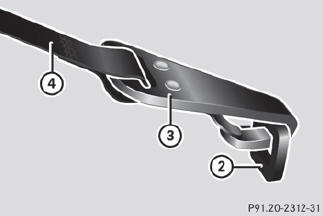
Route Top Tether belt 4 under the head
restraint between the two head restraint
bars.
Hook Top Tether hook 3 of Top Tether
belt 4 into Top Tether anchorage 2.
Ensure that:
• Top Tether hook 3 is hooked into Top Tether anchorage 2 as shown.
• Top Tether belt 4 is not twisted.
• Top Tether belt 4 can move freely between the rear seat backrest and the head
restraint.
Install the LATCH-type (ISOFIX) child
restraint system with Top Tether. Comply
with the manufacturer's installation
instructions when doing so. Make sure that
Top Tether belt 4 is tight.
The child restraint system with Top Tether
belt 4 has been removed:
Slide covering cap 1 onto Top Tether
anchorage 2.
WARNING
Vehicles with rear power seats:
Never change the rear seat position after
installing the child restraint. This could
• damage the child restraint
• introduce undesirable slack or tension into the seat belt
• loosen the child restraint
• misposition the child restraint
All of the above will lessen the
effectiveness of the child restraint and thus
increase the chance or severity of injury in
an accident.
See also:
Engine oil
Notes on the oil level
Depending on the driving style, the vehicle
consumes up to 0.9 US qts. (0.8 l) of oil over
a distance of 600 miles (1000 km). The oil
consumption may be higher than this ...
Setting the audio format
This function is not available on all DVDs. If it
is available, you can set the audio language
or the audio format. The number of settings
is determined by the DVD content. It is
possible that ...
Correct driver's seat position
Observe the safety guidelines on seat
adjustment.
Check whether you have adjusted
seat 3
properly.
Manual and electrical seat adjustment.
Electrical seat adjustment.
When adjusting the se ...