
Change of direction announced without a lane recommendation
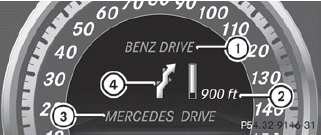
1. Road into which the change of direction
leads
2. Distance to change of direction and visual
distance display
3. Current road
4. Symbol for change of direction
When a change of direction has been announced, you will see visual distance display 2 next to the symbol for change of direction 4. This decreases in size as you approach the announced change of direction.
Change of direction announced with a lane recommendation
Lane recommendations are only displayed if the relevant data is available on the digital map.
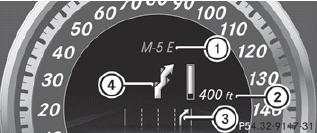
1. Road into which the change of direction
leads
2. Distance to change of direction and visual
distance display
3. Lane recommendation
4. Symbol for change of direction
On multi-lane roads, lane recommendation 3 may be shown for the next change of direction. Lanes may be added during a change of direction.
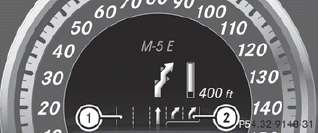
Lane recommendation display (example)
1 Uninterrupted lane
2 New lane during a change of direction
See also:
Assigning a point of interest category
Introduction
The categories and points of interest
available depend on the distance from the
vehicle position you have set for the point of
interest.
• point of interest in the vicinity of the ...
Automatic locking feature
The vehicle locks automatically when the ignition is switched on and the wheels
of the vehicle are turning at a speed of more than 9 mph (15 km/h).
You could therefore be locked out when:
the v ...
Additives
Only use DEF in accordance with ISO
22241. Do not use additives with DEF and
do not dilute DEF with water. This may
destroy the BlueTEC exhaust gas
aftertreatment system. ...