
Standard display
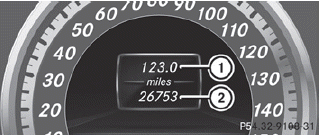
•► Press and hold the  button on
the
steering wheel until the Trip menu with
odometer 1 and trip odometer 2 is
shown.
button on
the
steering wheel until the Trip menu with
odometer 1 and trip odometer 2 is
shown.
See also:
Deleting all music files
This function deletes all music files from the
MUSIC REGISTER.
The deletion procedure may take several
minutes. In order to prevent malfunctions,
do not use COMAND during this period.
Select ...
Switching the windshield wipers on/off
WARNING
Wiper blades are components that are subject
to wear and tear. Replace the wiper blades
twice a year, preferably in the spring and fall.
Otherwise the windows will not be wiped ...
Using KEYLESS-GO
The KEYLESS-GO key must be outside the vehicle. All the doors must be closed.
Touch recessed sensor surface 1 on the door handle until the side windows
and the panorama roof with power tilt/s ...