
Setting and storing the parking position
You can position the front-passenger side exterior mirror in such a way that you can see the rear wheel on that side as soon as you engage reverse gear. You can store this position.
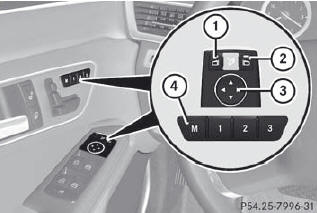
•► Make sure that the vehicle is stationary and that the SmartKey is in position 2 in the ignition lock.
•► Press button 2 for the exterior mirror on the front-passenger side.
•► Engage reverse gear.
The exterior mirror on the front-passenger side moves to the preset parking position.
•► Use adjustment button 3 to adjust the exterior mirror to a position that allows you to see the rear wheel and the curb.
The parking position is stored.
If you shift the transmission to another position, the exterior mirror on the frontpassenger side returns to the driving position.
You can also store the parking position using memory button M 4.
•► Make sure that the SmartKey is in position 2 in the ignition lock.
•► With the exterior mirror on the frontpassenger side activated, use adjustment button 3 to adjust the exterior mirror to a position which allows you to see the rear wheel and the curb.
•► Press memory button M 4 and one of the arrows on adjustment button 3 within three seconds.
The parking position is stored if the exterior mirror does not move.
If the mirror moves out of position, repeat the steps.
See also:
The drive system: Four new engines giving the ultimate in driving pleasure
Efficiency at the highest level: this is the common characteristic shared by
all four engines used in the Mercedes-Benz CLS-Class. All of the engines feature
increased performance and torque compa ...
Features
As we cram more technology into our homes, cars and palms, the ergonomics of
using said advancements should be getting better. Mercedes has a few elegant
systems in cars like the S-Class and new C ...
Introduction
When the automatic transmission is in position D, it is possible to restrict
or derestrict the shift range (). The shift range selected is shown in
the multifunction display. The automatic transmi ...