
General information
The program selector button allows you to choose between different driving characteristics.
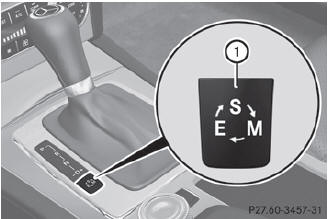
Example: program selector button
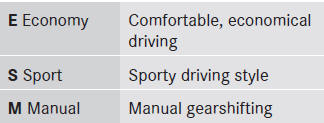
 For further information on the
automatic
drive program.
For further information on the
automatic
drive program.
Only change from automatic drive program E or S to manual drive program M when the vehicle is stationary.
 Press program selector button 1
repeatedly until the letter for the desired
gearshift program appears in the
multifunction display.
Press program selector button 1
repeatedly until the letter for the desired
gearshift program appears in the
multifunction display.
When the engine is started, the
automatic
transmission always switches to automatic
drive program E (drive program C in AMG
vehicles).
See also:
Switching the windshield wipers on/off
WARNING
Wiper blades are components that are subject
to wear and tear. Replace the wiper blades
twice a year, preferably in the spring and fall.
Otherwise the windshield will not be wiped
pr ...
Remote vehicle unlocking
If you have unintentionally locked your
vehicle (e.g. the SmartKey is still in the
vehicle) and a replacement SmartKey is not
available, the vehicle can be opened by a
Mercedes-Benz Customer A ...
Engine oil viscosity
Viscosity describes the flow characteristics
of a fluid. If an engine oil has a high viscosity,
this means that it is thick; a low viscosity
means that it is thin.
Select an engine oil with an ...