
Control panel for 3-zone automatic climate control
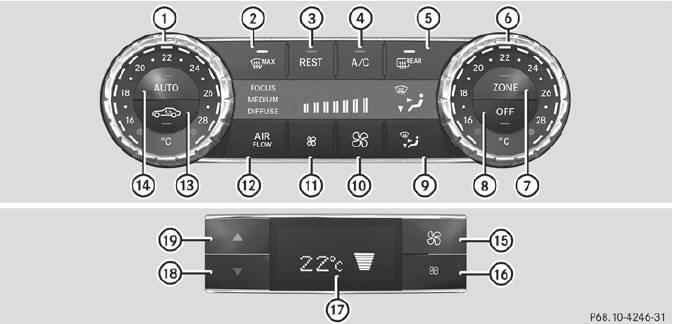
Control panel for 3-zone automatic climate control
Canada only
Front control panel
1 To set the temperature, left.
2 To defrost the windshield.
3 To activate/deactivate the residual heat function.
4 To activate/deactivate cooling with air dehumidification.
5 To switch the rear window defroster on/off.
6 To set the temperature, right.
7 To switch the ZONE function on/off.
8 To switch climate control on/off.
9 To set the air distribution.
10 To increase the airflow.
11 To reduce the airflow.
12 To adjust the climate control settings (AIR FLOW).
13 To activate/deactivate air-recirculation mode.
14 To set climate control to automatic
Rear control panel
15 To increase the airflow.
16 To reduce the airflow.
17 Display.
18 To reduce the temperature.
19 To increase the temperature.
See also:
Problems with the sliding sunroof
Problem: the sunroof cannot be closed
and you cannot see the cause.
WARNING
You could be severely or even fatally injured
when closing the sliding sunroof with
increased closing force ...
Problems with fuel and the fuel tank
Problem
Possible causes/consequences and
Solutions
Fuel is leaking from the vehicle.
Risk of explosion or fireThe fuel line or the fuel tank is
defective.
Turn the ...
General information
The ECO start/stop function is only available
for the S 63 AMG.
The ECO start/stop function is only available
in drive program C.
The ECO start/stop function switches the
engine off automatica ...