
Side marker lamps
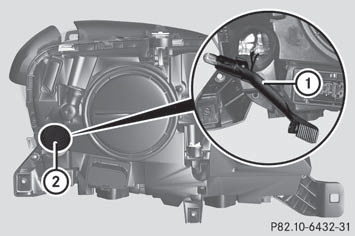
- Remove the cover in the front wheel arch.
- Turn cap 2 counter-clockwise and remove it.
- Pull out bulb holder 1.
- Take the bulb out of bulb holder 1.
- Insert the new bulb into bulb holder 1.
- Insert bulb holder 1.
- Align cap 2 and turn it clockwise.
- Install the cover in the front wheel arch.
See also:
Xenon bulbs
If your vehicle is equipped with Xenon bulbs,
you can recognize this by the following: the
cone of light from the Xenon bulbs moves
from the top to the bottom and back again
when you start the ...
Monitoring range of the sensors
Blind Spot Assist monitors the area shown in
the figure up to 10 ft (3 m) behind and
immediately adjacent to your vehicle.
WARNING
Blind Spot Assist monitors certain areas in the
im ...
Control panel for dual-zone automatic climate control
Control panel for dual-zone automatic climate control
Canada only
1 To set the temperature, left.
2 To defrost the windshield.
3 To switch the ZONE function on/off.
4 To activate/deactivate coo ...