
Route guidance inactive
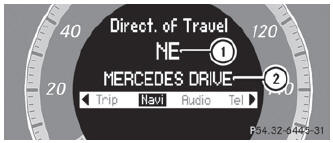
- Direction of travel
- Current road
See also:
Adjusting luxury head restraints
WARNING
When folding back the side cushions, never
reach between the side cushion and the
mounting post. You could otherwise be
trapped.
► To adjust the side bolsters of the h ...
Diesel Delight
Despite its hefty, 5,040-pound curb weight, the ML350 Bluetec moves out well,
with power in reserve at midrange speeds. The diesel's power characteristics are
well-suited to towing, and the SUV is ...
Drive sensibly – save fuel
Observe the following tips to save fuel:
– The tires should always be inflated to the recommended tire pressure.
– Remove unnecessary loads.
– Remove roof carriers when they are not needed.
– Warm ...