
Resetting values
You can reset the values of the following functions:
- Trip odometer
- Trip computer "From start"
- Trip computer "From reset"
- Press the
 or
or
 button on the steering wheel to
select the Trip menu.
button on the steering wheel to
select the Trip menu. - Press the
 or
or
 button to select the function that
you wish to reset.
button to select the function that
you wish to reset. - Press
 .
.
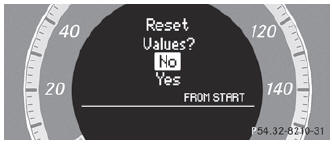
Resetting the trip computer "From start" (example)
- Press
 to select Yes and press
 to confirm.
See also:
Setting the center air vents
Center air vent, left
Center air vent, right
Center vent thumbwheel, right
Center vent thumbwheel, left
To open/close: turn thumbwheels 3 and 4 up or down. ...
Multiple users
Simultaneous use of the rearcompartment
disc drive
The two rear-compartment screens can be
operated almost entirely independently from
one another. However, there can be a conflict
in some me ...
Roadside Assistance button
► Open the stowage compartment under the
armrest.
► Press and hold Roadside Assistance
button 1 for more than two seconds.
This initiates a call to the Mercedes-Benz
Customer Assi ...