
Multifunction display
Values and settings as well as display messages are shown in the multifunction display.
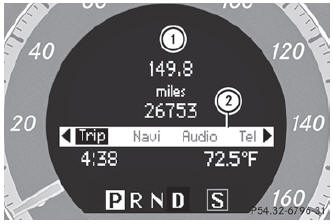
- : Description field
- ; Menu bar
- To show menu bar 2: press the
 or
or
 button on the steering wheel.
See also:
Selecting CD/audio DVD/MP3 discs
Selecting via the media list
In CD/audio DVD and MP3 mode: select
Media by sliding or turning
the
COMAND controller and press to
confirm.
The media list appears. The dot
indicates the ...
MB Info call button
Press and hold MB Info call button 1 for more than two seconds. This initiates
a call to the Mercedes-Benz Customer Assistance Center. The indicator lamp in
MB Info call button 1 flashes wh ...
Important safety notes
If a tire pressure monitor system is installed,
the vehicle's wheels have sensors that
monitor the tire pressures in all four tires. The
tire pressure monitor warns you when the
pressure drops ...