
Replacing the windshield wiper blades
Removing the wiper blades
 Before changing the wiper blades, always set the wiper arms to a vertical position
using the combination switch. There is otherwise a risk of damaging the hood.
Before changing the wiper blades, always set the wiper arms to a vertical position
using the combination switch. There is otherwise a risk of damaging the hood.
Moving the wiper blades to a vertical position
Vehicles without KEYLESS-GO
- Turn the SmartKey to position 1 or 2 in the ignition lock.
- Set the windshield wipers to position
 .
. - When the wiper arms have reached a vertical position, turn the SmartKey to position 0 and remove it from the ignition lock.
Vehicles with KEYLESS-GO
- Switch off the engine.
- Remove your foot from the brake pedal.
- Set the windshield wipers to position
.
- Press the Start/Stop button repeatedly until the windshield wipers start.
- When the wiper arms have reached a vertical position, press the Start/Stop button.
Removing the wiper blades
- Fold the wiper arm away from the windshield until it engages.
- Set the wiper blade at right angles to the wiper arm.
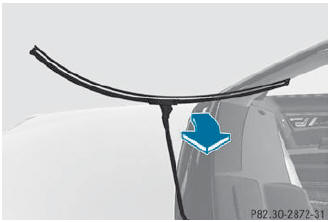
- Remove the wiper blade from the retaining pin on the wiper arm in the direction of the arrow.
Installing the wiper blades
- Push the new wiper blade onto the retaining pin on the wiper arm in the opposite direction to the arrow. Make sure that the wiper blade slides fully onto the retaining pin on the wiper arm.
- Turn the wiper blade parallel to the wiper arm.
- Fold the wiper arm back onto the windshield.
See also:
Transferring data to another system
(vehicle)
Insert/connect the storage medium (SD
card or USB stick) with the saved data into/
to the relevant interface.
Select Vehicle in the main function bar by
turning the COMAND controller and
p ...
Closing the hood
WARNING
When closing the hood, use extreme caution
not to catch hands or fingers. Be careful that
you do not close the hood on anyone.
Make sure the hood is securely engaged
before driving ...
Loading guidelines
WARNING
Always fasten items being carried as securely as possible using cargo tie-down
rings and fastening materials appropriate for the weight and size of the load.
In an accident, during ha ...