
Operation
Depending on the date of manufacture of your vehicle, the
 or
or
 symbol for the automatic headlamp mode/daytime
running lamps is located on the light switch.
symbol for the automatic headlamp mode/daytime
running lamps is located on the light switch.
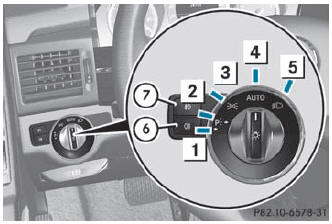
Illustration: light switch with the
symbol for the automatic headlamp mode/daytime
running lamps
 Left-hand standing lamps
 Right-hand standing lamps
 Parking lamps, license plate and
instrument cluster lighting
Parking lamps, license plate and
instrument cluster lighting
 Automatic headlamp mode/daytime
running lamps
Automatic headlamp mode/daytime
running lamps
 Low-beam/high-beam headlamps
 Rear fog lamp
 Front fog lamps
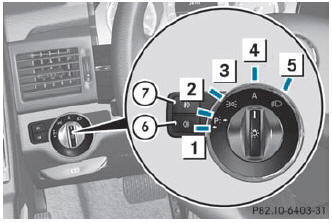
Illustration: light switch with the
 symbol for the automatic headlamp mode/daytime
running lamps
symbol for the automatic headlamp mode/daytime
running lamps
Left-hand standing lamps
Right-hand standing lamps
Parking lamps, license plate and
instrument cluster lighting
 Automatic headlamp mode/daytime
running lamps
Automatic headlamp mode/daytime
running lamps
Low-beam/high-beam headlamps
Rear fog lamp
Front fog lamps
The turn signals, high-beam headlamps and the high-beam flasher are operated using the combination switch ().
 Switch off the parking lamps and standing lamps when you leave the vehicle.
This prevents the battery from discharging.
Switch off the parking lamps and standing lamps when you leave the vehicle.
This prevents the battery from discharging.
The exterior lighting (except the parking/ standing lamps) switches off automatically if you:
- remove the SmartKey from the ignition lock
- open the driver's door with the SmartKey in position 0
If you hear a warning tone when you leave the vehicle, the lights may still be switched on.
Turn the light switch to or
.
See also:
Information about driving abroad
Converting to symmetrical low beam when driving abroad: switch the headlamps
to symmetrical low beam in countries in which traffic drives on the opposite side
of the road to the country where the ...
Functions available during a call
Overview
Telephone operation with a single call
1 Person you are calling
2 Icon for active telephone connection
3 NEW to call other parties
4 To switch hands-free microphone on/off
5 T ...
Important safety notes
WARNING
Do not adjust the steering wheel while driving.
Adjusting the steering wheel while driving
could cause the driver to lose control of the
vehicle.
The electrical steering wheel adjus ...