
AMG displays
 Press
Press  or
or
 on the steering wheel
to select the AMG menu.
on the steering wheel
to select the AMG menu.
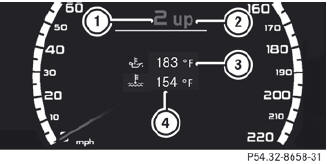
1 Gear indicator
2 Upshift indicator
3 Engine oil temperature
4 Coolant temperature
Upshift indicator UP 2 indicates that the engine has reached the overrevving range when in the manual gearshift program.
Upshift indicator UP 2 fades out other messages until you have shifted up.
When the engine oil temperature is below 80 °C, the oil temperature is shown in blue.
Avoid driving at full engine output during this time.
 S 63 AMG: additionally, the status of the
ECO start/stop function will
be displayed.
S 63 AMG: additionally, the status of the
ECO start/stop function will
be displayed.
See also:
Recommended tire pressure
The recommended tire pressure applies to
the tires mounted at the factory.
The Tire and Loading Information placard
contains the recommended tire pressures for
cold tires on a fully loaded vehi ...
Important safety notes
A license agreement must exist in order
to activate the mbrace service. Ensure that
your system is activated and ready for use,
and press the MB Info call button
to
register. If any of the st ...
Child-proof locks for the rear doors
WARNING
Children could open a rear door from inside
the vehicle. This could result in serious
injuries or an accident. Therefore, when
children ride in the rear always secure the rear
doors ...