
Storing settings
With the memory function, you can store up to three different settings, e.g. for three different people.
The following settings are stored as a single memory preset:
• position of the seat, backrest and head
restraint
• driver's side: steering wheel position
• driver's side: position of the exterior
mirrors on the driver's and front-passenger
sides
WARNING 
Do not activate the memory function while
driving. Activating the memory function while
driving could cause the driver to lose control
of the vehicle.
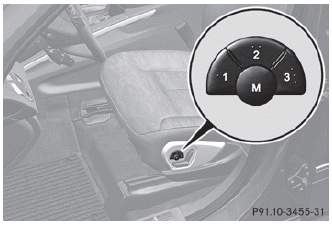
► Adjust the seat.
► On the driver's side, adjust the steering wheel and the exterior mirrors.
► Press memory button M and one of the storage position buttons 1, 2 or 3 within three seconds.
The settings are stored in the selected preset position. A tone sounds when the settings have been completed.
See also:
Opening/closing the garage door
Once programmed, the integrated garage
door opener will assume the function of the
garage door system's remote control. Please
also read the operating instructions for the
garage door system.
...
Deactivating/activating ESP® (except AMG vehicles)
WARNING
ESP® should not be deactivated during
normal driving other than in the
circumstances described below. Disabling
the system will reduce vehicle stability in
driving maneuvers.
Do no ...
Product information
Mercedes-Benz recommends that you use
genuine Mercedes-Benz parts, conversion
parts and accessories that have been
approved for the type of vehicle.
Mercedes-Benz tests genuine parts as well as ...