
Switching on Night View Assist Plus
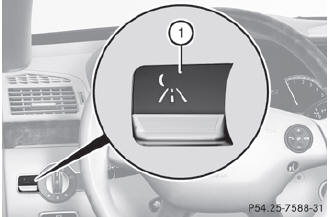
You can only activate Night View Assist Plus if:
• the SmartKey is in position 2 in the ignition lock.
• it is dark.
• the light switch is in the  or
or
 position.
• reverse gear has not been engaged.
 Press button 1.
The Night View Assist Plus display appears in the multifunction display.
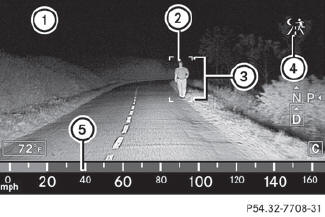
1 Night View Assist Plus display
2 Pedestrian recognized
3 Framing
4 Symbol for active pedestrian recognition
5 Speed display
 The infrared lamps switch on
automatically from a speed of about 6 mph
(10 km/h). This means that you do not have
the full visual range while the vehicle is
stationary and cannot check whether Night
View Assist Plus is working.
The infrared lamps switch on
automatically from a speed of about 6 mph
(10 km/h). This means that you do not have
the full visual range while the vehicle is
stationary and cannot check whether Night
View Assist Plus is working.
When you activate Night View Assist Plus, speed display 5 in the multifunction display changes. Speed display 5 is shown as a bar at the bottom edge of the multifunction display. This line is no longer available for basic menus. You have to deactivate Night View Assist Plus if you want to change a setting using the buttons on the multifunction steering wheel.
See also:
The first 1000 miles (1500 km)
The more you look after the engine when it is new, the more satisfied you will
be with its performance in the future.
Drive at varying vehicle speeds and engine speeds for the first 1000 miles
...
Cargo net (Wagon)
Important safety notes
It is particularly important to use a safety net
if the vehicle is loaded with small objects
above the level of the backrests. For safety
reasons, always use a cargo net ...
Power washers
WARNING
Do not use power washers with circular-jet
nozzles (dirt grinders) to clean your vehicle, in
particular the tires. You could otherwise
damage the tires and cause an accident.
Alway ...