
Parking
The following instructions refer to parking in a space on the front-passenger side. To park in a space on the driver's side, mirror the instructions.
WARNING
The Parking Guidance is only an aid and may
not detect all obstacles. The Parking
Guidance does not relieve you of the
responsibility to pay attention. You are always
responsible for safety and must continue to
pay attention to your immediate surroundings
when parking and maneuvering. Otherwise,
you could endanger yourself and others.
 Stop the vehicle when the blue parking
space symbol shows the desired parking
space in the instrument cluster.
Stop the vehicle when the blue parking
space symbol shows the desired parking
space in the instrument cluster.
Engage reverse gear.
The multifunction display shows the message: Check surroundings Confirm with OK.
Press  on the multifunction
steering
wheel to confirm.
on the multifunction
steering
wheel to confirm.
The display in the instrument cluster switches to Parking Guidance.
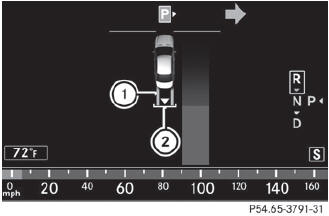
1 Green lane
2 White bracket marking the target position
Depending on the distance, you may have
to reverse along the lane towards the
parking space. This is indicated by green
lane 1.
Continue backing up until you hear a tone.
Stop; the parking position has been reached and is marked by white bracket 2 with an arrow for the target position.
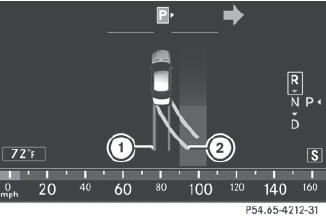
Steering tips
1 Red lane indicating the route the vehicle
will take with the steering wheel in its
current position
2 Yellow lane indicating the route the
vehicle will take when you have turned the
steering wheel in the required direction
Turn the steering wheel while the vehicle is
stationary until red lane 1 and yellow
lane 2 overlap.
Lane 2 is then marked in green and you hear a tone. If the parking space is inside the area displayed, the end of the green lane is marked with a white bracket and an arrow showing the target position.
Backing up into a parking space
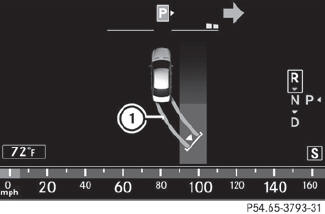
1 Lane turns green when the steering wheel is turned in the correct direction
Keep the steering wheel in that position
and reverse carefully.
Stop as soon as you hear a tone.
The vehicle has reached the position in which you need to countersteer.
Countersteering
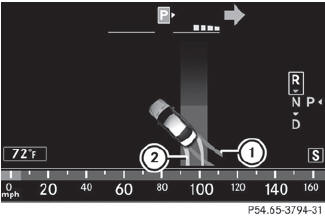
1 Red lane indicating the route the vehicle
will take with the steering wheel in its
current position
2 Yellow lane indicating the route the
vehicle will take when you have turned the
steering wheel in the required direction
Turn the steering wheel while the vehicle is
stationary until red lane 1 and yellow
lane 2 overlap.
Lane 2 is then marked in green and you hear a tone. A white arrow and white bracket are shown to indicate the target position.
Driving to the final position
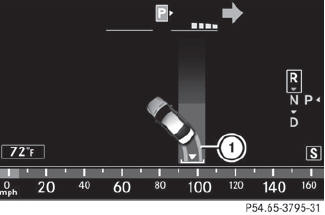
1 Lane turns green when the steering wheel is turned in the correct direction
Keep the steering wheel turned in that
direction and reverse carefully until you
have reached the final position.
The Parking Guidance finished message appears in the multifunction display and a tone sounds.
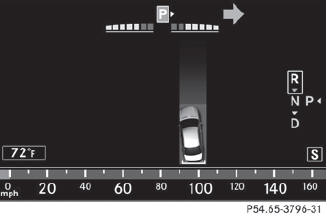
Final position
Depending on the size of the parking space, you may now be in an angled position in the parking space. If possible, Parking Guidance will guide you as far back as possible towards the rear limit of the parking space.
Maneuver to the final position if necessary.
Always observe the warning messages
displayed by PARKTRONIC.
See also:
Automatic drive program
Drive program E (drive program C on AMG vehicles) is characterized by the
following:
• comfort-oriented engine and automatic transmission settings
• optimal fuel consumption resulting from the aut ...
Important safety notes
Have the batteries changed at a qualified
specialist workshop.
WARNING
Batteries contain toxic substances.
Swallowing batteries can lead to serious
health issues or death.
Keep batteries ...
Parking lamps/standing lamps
(halogen headlamps)
- Turn housing cover 1 counter-clockwise
and pull it out.
- Pull out bulb holder 2.
- Take the bulb out of bulb holder 2.
- Insert the new bulb into bulb holder 2.
- Insert bulb holder 2.
- A ...