
Deactivating DISTRONIC PLUS
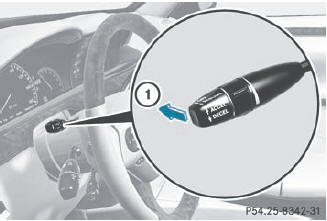
There are several ways to deactivate DISTRONIC PLUS:
 Briefly press the cruise control lever
forwards 1.
Briefly press the cruise control lever
forwards 1.
or
Brake, unless the vehicle is stationary.
When you deactivate DISTRONIC PLUS, the DISTRONIC PLUS Off message is shown in the multifunction display for approximately five seconds.
 The last speed stored remains stored until
you switch off the engine.
The last speed stored remains stored until
you switch off the engine.
DISTRONIC PLUS is not deactivated if you
depress the accelerator pedal. If you
accelerate to overtake, DISTRONIC PLUS
adjusts the vehicle's speed to the last
speed stored after you have finished
overtaking.
DISTRONIC PLUS is automatically
deactivated if:
• you engage the electric parking brake or if
the vehicle is automatically secured with
the electric parking brake.
• you are driving slower than
15 mph (25 km/h) and there is no vehicle
in front, or if the vehicle in front is no longer
detected.
• ESP® intervenes or you deactivate ESP®.
• the transmission is in the P, R or N position.
• you switch off the radar sensor system.
• you pull the cruise control lever towards
you in order to pull away and the frontpassenger
door or one of the rear doors is
open.
• the vehicle has skidded.
If DISTRONIC PLUS is deactivated, you will hear a warning tone. The DISTRONIC PLUS Off message is shown in the multifunction display for approximately five seconds.
WARNING
The DISTRONIC PLUS switches off and
releases the brakes when the vehicle
decelerates below the minimum speed of
20 mph (30 km/h) by operation of the system
unless the DISTRONIC PLUS detects a vehicle
directly ahead of you. At that time the driver
must apply the brakes in order to reduce
vehicle speed further or bring it to a stop.
See also:
Changing the windshield wiper blades
Removing the wiper blades
- Remove the SmartKey from the ignition
lock.
- Fold the wiper arm away from the
windshield.
- Firmly press release knob 1 and pull the
wiper blade upwards from th ...
Drinking and driving
WARNING
Drinking and driving and/or taking drugs and
driving are very dangerous combinations.
Even a small amount of alcohol or drugs can
affect your reflexes, perceptions and
judgment.
The ...
Adjusting the head restraints manually
Adjusting the head restraint height
To raise: pull the head
restraint up to the desired position.
To lower: press release catch 1 in
the direction of the arrow and push the head restraint do ...