
Switching to Media Interface mode
General notes
In extreme cases, starting up individual functions can take up to several minutes – this depends on the external device and its content (e.g. video podcasts).
Only use the original software to save files on iPods or MP3 players. Otherwise, some or all functions may not be available.
Option 1
 Connect an external device.
COMAND activates the device. Following this, the basic display appears if there are any playable files on the data carrier.
or
Select Audio in the main function bar by
sliding  and turning
 the COMAND
controller and press
the COMAND
controller and press  to confirm.
If you had previously selected Media Interface mode, this will now be activated.
If another audio source is switched on, you can now switch to Media Interface mode in the audio menu.
Select Audio by sliding
and turning
the COMAND controller and press
to confirm.
The audio menu appears.
Select Media Interface and press
to
confirm.
Option 2
Select Audio by sliding
and turning
the COMAND controller and press
to confirm.
The audio menu appears.
Select Media Interface and press
to
confirm.
Option 3
In the media list, turn
the COMAND controller to select the entry
under the corresponding position and
press to confirm.
COMAND activates the connected device.
You will see a message to this effect. The basic display then appears.
If no device is connected, you will see the Media Interface entry instead of a device name.
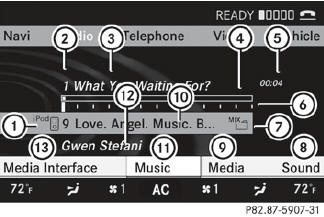
Example display: iPod mode
1 Data medium type
2 Track number
3 Track name
4 Graphic time display
5 Track time
6 Graphic track display
7 Current playback settings (no symbol for "Normal track sequence")
8 Sound settings
9 Media list
10 Album name (if available)
11 Categories, playlists and/or folders
12 Artist (if available)
13 Playback options
Type of device 1 connected is indicated by the corresponding symbol for iPod, MP3 player or USB mass storage device.
 If the device connected does not contain
any playable tracks, a message appears to
this effect.
If the device connected does not contain
any playable tracks, a message appears to
this effect.
See also:
Seat belt adjustment
The seat-belt adjustment function adjusts the
driver's and front-passenger seat belt to the
upper body of the occupants.
The belt strap is tightened slightly when:
- you engage the belt tongue i ...
Temperature
WARNING
The temperature grade for this tire is established for a tire that is properly
inflated and not overloaded. Excessive speed, underinflation, or excessive loading,
either separately o ...
Rear fog lamp
To switch on the rear fog lamp: turn the
SmartKey in the ignition lock to position 2
or start the engine.
Turn the light switch to or
(vehicles with front fog lamps), or turn the
light s ...