
Front air bags
The front air bags increase protection for the driver's and front-passenger's head and chest.
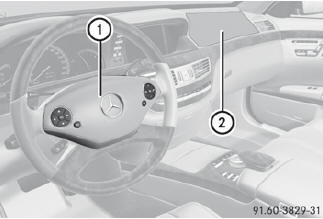
Driver's air bag 1 deploys in front of the steering wheel; front-passenger front air bag 2 deploys in front of and above the glove box.
They are deployed:
• in the event of certain frontal impacts
• if the system determines that air bag deployment can offer additional
protection to that provided by the seat belt
• if the seat belt is fastened
• independently of other air bags in the vehicle
If the vehicle overturns, the front air bags are generally not deployed unless the system detects high vehicle deceleration in a longitudinal direction.
Your vehicle has adaptive, two-stage front air bags. In the event of a collision, the air bag control unit evaluates the vehicle deceleration. In the first deployment stage, the front air bag is filled with enough propellant gas to reduce the risk of injuries.
The front air bag is fully deployed if a second deployment threshold is exceeded within a few milliseconds.
The deployment of the front-passenger front air bag is also influenced by the weight category of the front passenger, which is determined by the Occupant Classification System (OCS).
The lighter the passenger side occupant, the higher the vehicle deceleration rate required (predicted at the start of the impact) for second stage inflation of the front-passenger front air bag. In the second stage, the front air bags are inflated with the maximum amount of propellant gas available.
The front air bags are not deployed in situations where a low impact severity is predicted. You will then be protected by the fastened seat belt.
The front-passenger front air bag will only deploy if:
• the system, based on the OCS weight sensor readings, detects that the
frontpassenger seat is occupied.
• the  indicator lamp in the center
console is not lit,.
indicator lamp in the center
console is not lit,.
• the air bag control unit predicts a high impact severity.
See also:
Hood
Opening the hood
WARNING
Do not pull the release lever while the vehicle
is in motion. Otherwise, the hood could be
forced open by passing air flow.
This could cause the hood to come loose ...
Checking the coolant level
Only check the coolant level when the vehicle
is on a level surface and the engine has cooled
down.
Turn the SmartKey to position
2 in the ignition lock.
On vehicles with KEYLESS-GO, press the ...
Locking the vehicle
If the vehicle can no longer be locked with the
SmartKey, you can lock it by taking the
following steps. If the central locking in the
vehicle is malfunctioning, you cannot lock the
trunk.
P ...