
Manual drive program
Switching on the manual drive program
The manual drive program is only available for AMG vehicles.
Manual drive program M is different from drive programs S and S+ with regard to spontaneity, responsiveness and smoothness of gear changes.
Manual drive program M can be selected using the drive program selector. In manual drive program M, you can change gear yourself using the steering wheel paddle shifters if the transmission is in position D.
The gear currently selected and engaged is shown in the multifunction display.
•► Turn the drive program selector until M appears in the multifunction display.
The indicator M on the drive program selector lights up in red.
Upshifting
In manual drive program M, the automatic transmission does not shift up automatically even when the engine limiting speed for the current gear is reached. When the engine limiting speed is reached, the fuel supply is cut to prevent the engine from overrevving. Always make sure that the engine speed does not reach the red area of the tachometer. There is otherwise a risk of engine damage.
•► Pull the right-hand steering wheel paddle shifter
The automatic transmission shifts up to the next gear.
Before the engine speed reaches the red area, an upshift indicator appears in the multifunction display.
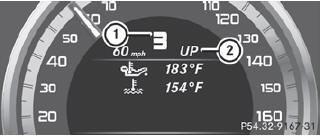
1. Gear indicator
2. Upshift indicator
Downshifting
•► Pull the left-hand steering wheel paddle shifter
The automatic transmission shifts down to the next gear.
If you brake the vehicle or stop without shifting down, the automatic transmission will shift down to a gear that will allow the vehicle to accelerate or pull away again.
Kickdown
Kickdown is not possible in manual drive program M.
Switching off the manual drive program
•► Turn the drive program selector until C, S or S+ appears in the multifunction display.
See also:
Qualified specialist workshop
An authorized Mercedes-Benz Center is a qualified specialist workshop. It has
the necessary specialist knowledge, tools and qualifications to correctly carry
out the work required on your vehicle. ...
High-beam headlamps (halogen
headlamps)/cornering lamps (Bi-Xenon
headlamps)
•► Switch off the lights.
•► Open the hood.
•► Turn housing cover 1 counter-clockwise
and pull it out.
•► Turn bulb holder 2 counter-clockwise and
pull it out.
•υ ...
Checking the oil level using the oil
dipstick
Example: vehicles with a gasoline engine
Example: vehicles with a diesel engine
– Park the vehicle on a level surface.
To check the oil level with the engine at
operating temperature, swi ...