
Switching on/off
The three blue indicator lamps in the buttons indicate the ventilation level you have selected.
If the battery voltage is too low, the seat ventilation may switch off.
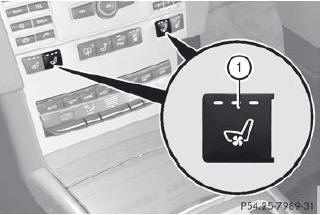
•► Make sure that the SmartKey is in position 2 in the ignition lock.
•► To switch on: press button 1 repeatedly until the desired ventilation level is set.
You can open the side windows and the sliding sunroof using the "Convenience opening" feature. The seat ventilation of the driver's seat automatically switches to the highest level.
To switch off: press button 1 repeatedly until all the indicator lamps go out.
See also:
Notes on the oil level
Depending on the driving style, the vehicle
consumes up to 0.9 US qts. (0.8 l) of oil over
a distance of 600 miles (1000 km). The oil
consumption may be higher than this when
the vehicle is ne ...
Ashtray in the front-compartment
center console
The holder under the ashtray is not heat
resistant. Before placing lit cigarettes in the
ashtray, make sure that the ashtray is
properly engaged. Otherwise, the holder
could be damaged.
...
Radiator
Vehicles with a diesel engine: do not
cover the radiator, for example with a
winter front or bug cover. Otherwise, the
readings of the on-board-diagnostic
system may be inaccurate. Some of these
...