
AMG vehicles
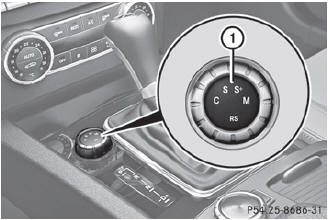
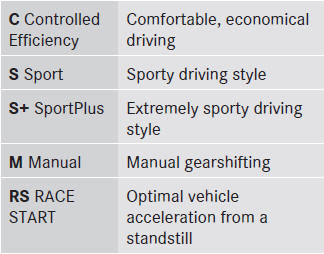
Drive program selector with manual drive program
 For further information on the
automatic
drive program.
For further information on the
automatic
drive program.
Only change from automatic drive program C, S or S+ to manual drive program M when the vehicle is stationary.
 Turn drive program selector 1
until the
desired drive program appears in the
multifunction display in the speedometer.
Turn drive program selector 1
until the
desired drive program appears in the
multifunction display in the speedometer.
The drive program indicator on drive
program selector 1 lights up in red.
The automatic transmission
shifts to
automatic drive program C each time the
engine is started.
RS cannot be selected
during normal
driving. For further information on RACE
START.
See also:
Turn signals
Turn signals
1 High-beam headlamps
2 Right turn signal
3 High-beam flasher
4 Left turn signal
To indicate briefly:
press the combination
switch briefly to the pressure point in the
direc ...
Interchanging the wheels
WARNING
Rotate front and rear wheels only if the tires
are of the same dimension.
If your vehicle is equipped with mixed-size
tires (different tire dimensions front vs. rear),
tire rotation i ...
Opening and closing
Overhead control panel
1 To raise
2 To open
3 To close/lower
The panorama roof with power tilt/sliding
panel can only be operated when the roller
sunblind is open.
- Turn the SmartKey to ...