
Resetting triggered NECK-PRO head restraints
 WARNING
For safety reasons, have the NECK-PRO head restraints checked at an authorized Mercedes-Benz Center after a rear-end collision.
WARNING
When pushing back the NECK-PRO head restraint cushion, make sure your fingers do not become caught between the head restraint cushion and the cover. Failure to observe this could result in injuries.
Resetting the NECK-PRO head restraints requires a lot of strength. If you have difficulty resetting the NECK-PRO head restraints, have this work carried out at a qualified specialist workshop, e.g. an authorized Mercedes-Benz Center.
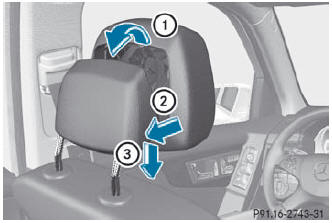
- Press the base of the NECK-PRO head restraint cushion back in the direction of arrow 2 as far as it will go.
- Push the NECK-PRO head restraint cushion down into the guide in the direction of arrow 3 as far as it will go.
- Firmly fold the NECK-PRO head restraint cushion back in the direction of arrow 1 until it engages.
- Repeat this procedure for the second NECK-PRO head restraint.
See also:
Opening and closing
Overhead control panel
1 To open
2 To open
3 To close
Turn the SmartKey to position
1 or 2 in the ignition lock.
Press or pull the
switch in the corresponding
direction.
If you press ...
Removing a wheel
► Unscrew the uppermost wheel bolt
completely.
► Screw alignment bolt 1 into the thread
instead of the wheel bolt.
► Unscrew the remaining wheel bolts fully.
Do not place wh ...
Storing and maintaining the currentspeed
You can store the current speed if you are
driving faster than 20 mph (30 km/h).
► Accelerate the vehicle to the desired
speed.
► Briefly press the cruise control lever
up 1 or down ...