
Setting the time/date format
 Select Vehicle in the main function bar by
turning
Select Vehicle in the main function bar by
turning  the COMAND controller and
press
the COMAND controller and
press  to confirm.
Select System by turning
the
COMAND controller and press to
confirm.
Select Time by turning the
COMAND
controller and press to confirm.
Select Format and press to
confirm.
The  symbols show the current
settings.
symbols show the current
settings.
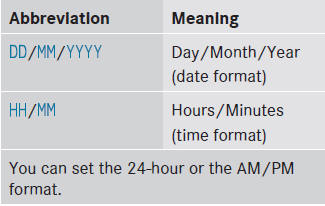
Set the format by turning the
COMAND controller and press to
confirm.
See also:
Resetting the panorama roof with
power tilt/sliding panel and the roller
sunblinds
Reset the panorama roof with power tilt/
sliding panel and the roller sunblinds if the
panorama roof with power tilt/sliding panel
or the roller sunblinds do not move smoothly.
•► Turn th ...
Vehicle equipment
This Operator's Manual describes all models
and all standard and optional equipment of
your vehicle available at the time of
publication of the Operator's Manual.
Country-specific differences a ...
Changing the battery
You require a CR 2025 3 V cell battery.
Take the mechanical key out of the SmartKey ().
Press mechanical key 2 into the opening in the SmartKey in the direction
of the arrow until batte ...