
Resetting values
You can reset the values of the following functions:
- Trip odometer
- Trip computer "From start"
- Trip computer "From reset"
•► Press the  button on the
steering wheel to select the Trip menu.
button on the
steering wheel to select the Trip menu.
•► Press the  button to select the
function that you wish to reset.
button to select the
function that you wish to reset.
•► Press  .
.
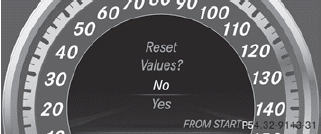
Resetting the trip computer "From start" (example)
•► Press  to select Yes and press
 to confirm.
See also:
Safety systems
Display messages
(USA only)
(Canada only) The red brake system
warning lamp comes on
while the engine is
running. A warning tone
also sounds.
Possible causes/consequences and ►
Soluti ...
Radiator
Vehicles with a diesel engine: do not
cover the radiator, for example with a
winter front or bug cover. Otherwise, the
readings of the on-board-diagnostic
system may be inaccurate. Some of the ...
View through the camera
The area behind the vehicle is displayed as a
mirror image, as in the rear-view mirror.
WARNING
The rear view camera is only an aid and may
display obstacles
• from a distorted perspe ...