
Attaching the roof carrier
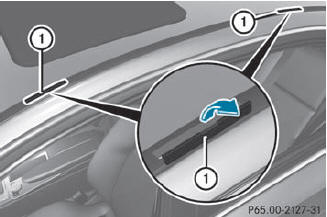
Attaching the roof carrier
 Open covers 1 carefully in the
direction of
the arrow.
Open covers 1 carefully in the
direction of
the arrow.
Fold covers 1 upwards.
Only secure the roof carrier to the
anchorage points under covers 1.
Observe the manufacturer's
installation
instructions.
See also:
Switching on DISTRONIC PLUS, storing
the current speed and maintaining it
Important safety notes
WARNING
The vehicle can be braked when DISTRONIC
PLUS is activated. For this reason, deactivate
DISTRONIC PLUS if the vehicle is to be set in
motion by other means ( ...
Vehicle equipment
This Operator's Manual describes all models
and all standard and optional equipment of
your vehicle available at the time of
publication of the Operator's Manual.
Country-specific differences a ...
Coolant
Important safety notes
The coolant is a mixture of water and
antifreeze/corrosion inhibitor. It performs
the following tasks:
• anti-corrosion protection
• antifreeze protection
• raising the bo ...